
Debugging Build Failures#
There are several common failures that can occur when building packages with pyodide-build. This guide helps you identify the phase and apply the right fix.
Configuration errors#
CMake: “Could not find toolchain file”#
The CMake toolchain file wasn’t found or passed correctly.
Fix: pyodide-build injects the toolchain automatically. If it doesn’t work:
CMAKE_TOOLCHAIN_FILE=$(pyodide config get cmake_toolchain_file)
pyodide build . -Ccmake.toolchain="$CMAKE_TOOLCHAIN_FILE"
Meson: “Cross file not found” or wrong target architecture#
The Meson cross file wasn’t injected or passed correctly.
Fix:
MESON_CROSS_FILE=$(pyodide config get meson_cross_file)
pyodide build . -Csetup-args=--cross-file="$MESON_CROSS_FILE"
Compilation errors#
“‘something.h’ file not found”#
These may fall into two categories:
system headers that is not supported by Emscripten
a third party header that is not linked properly
If the header is from a system library, search it in the Emscripten repository to check if it’s available. If it’s not available, you need to update your code to use a different approach.
If the header is from a third party library, check if it’s searched and linked properly.
As you need a cross-compiled version of the library, you need to check if pkg-config or CMake
or other build systems are configured to find the cross-compiled version correctly.
“error: unsupported option ‘-some-config’”#
It means that the Emscripten compiler doesn’t support the option.
Fix: Conditionally disable the flag using the PYODIDE environment variable:
import os
if not os.environ.get("PYODIDE"):
    extra_compile_args.append("-some-config")
“error: use of undeclared identifier” (platform-specific code)#
Code uses platform-specific APIs (Linux, macOS, Windows) that don’t exist in Emscripten.
Fix: Guard with __EMSCRIPTEN__:
#ifdef __EMSCRIPTEN__
// Emscripten-compatible code
#else
// Platform-specific code
#endif
Link errors#
“wasm-ld: error: undefined symbol: some_function”#
A function is referenced but not defined in any linked object.
Fixes:
Check if a library needs to be compiled for Emscripten first.
Make sure you are linking the correct library at the link step.
Try a different export mode:
pyodide build . --exports whole_archiveIf the symbol comes from Python itself, it should be available — file an issue
“wasm-ld: error: function signature mismatch”#
This is a very common error coming from legacy C/C++ code that was not designed with WebAssembly in mind.
In C, function signatures are not strictly checked at compile time, but WebAssembly requires strict signature matching.
wasm-ld: error: function signature mismatch: some_func
>>> defined as (i32, i32) -> i32 in some_static_lib.a(a.o)
>>> defined as (i32) -> i32 in b.o
Fix: Check the signatures of the conflicting functions and fix them to match.
“wasm-ld: error: duplicate symbol”#
The same symbol is defined in multiple objects.
This commonly happens when you are linking the same static library multiple times into different object files.
Fixes:
Try to switch to the shared library if available.
Try to avoid linking the same static library multiple times.
If you are using
--exports whole_archive, try using--exports defaultinstead. It will reduce the number of symbols that are exported.
“RuntimeError: function signature mismatch”#
This is a runtime error (not a build error) that occurs when calling a function pointer with the wrong type. WebAssembly enforces strict function pointer typing — unlike native platforms which may silently allow mismatches. The most common cause is confusion between i32 return type and void return type in C function pointer casts.
This is a common but also a tricky error to debug. Here are some steps to help you diagnose and fix it:
Rebuild the package with debug symbols enabled.
use CFLAGS='-g2' compiler flag set to enable debug symbols. This will rename the symbols in the Wasm file to make them more readable.
Open the browser’s developer tools and look at the stack trace.
Use a Chromium-based browser (they have the best Wasm debugging support). The browser console will show a stack trace — click on the innermost stack frame:
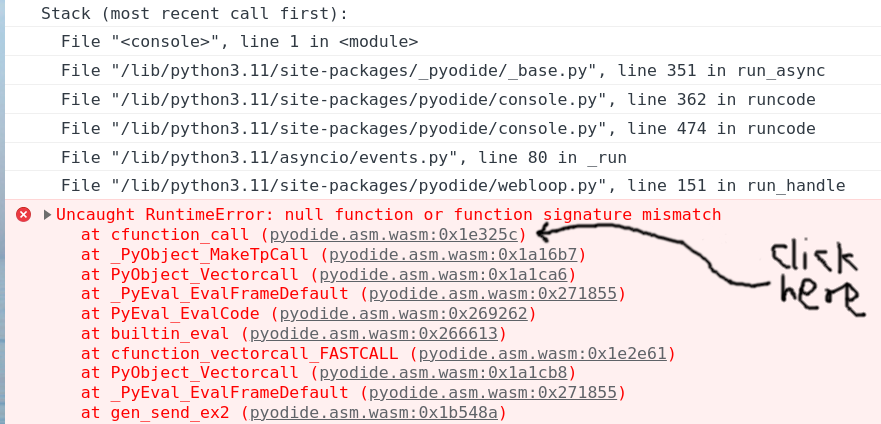
Clicking the offset will take you to the corresponding Wasm instruction, which should be a call_indirect. This shows the expected function signature:
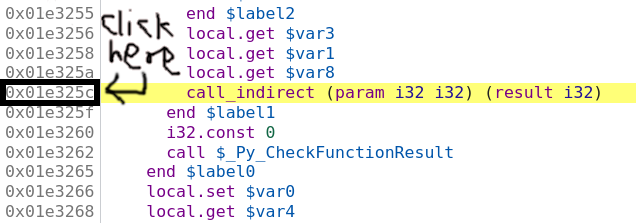
So we think we are calling a function pointer with signature (param i32 i32) (result i32) — two i32 inputs, one i32 output. Set a breakpoint by clicking on the address, then refresh the page and reproduce the crash.
Once stopped at the breakpoint, the bottom value on the stack is the function pointer. You can look it up in the console:
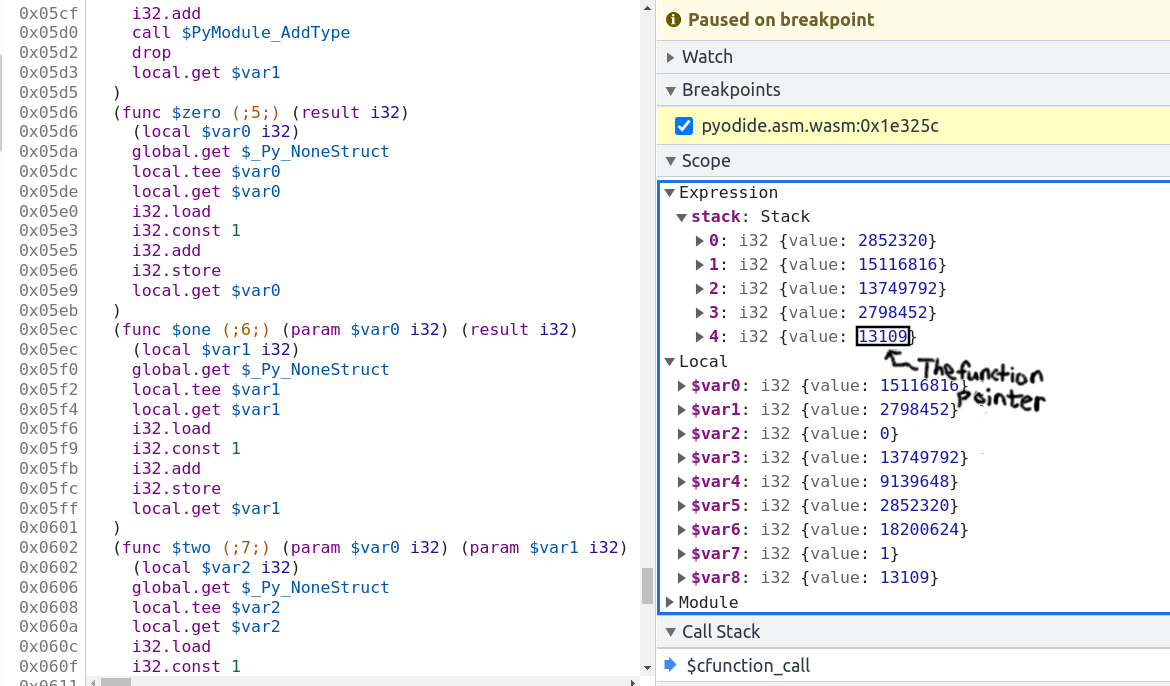
> pyodide._module.wasmTable.get(stack[4].value)  // stack[4].value === 13109
< ƒ $one() { [native code] }
The bad function pointer’s symbol is one. Clicking on $one brings you to its source, showing the actual signature:
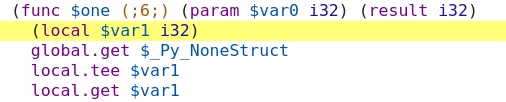
The function has signature (param $var0 i32) (result i32) — one i32 input, one i32 output. This mismatch (called with two args, defined with one) is the cause of the crash.
Find the caller and callee symbols in the source code and fix the type mismatch. If you are not familiar with the codebase, often AI code agents are really good at this kind of task, so delegating this to them can be a good idea.
Build system errors#
pip/build isolation failures#
If the build fails during dependency installation in the isolated environment:
Fix: Use --no-isolation and manage dependencies manually:
pip install setuptools numpy cython  # install build deps
pyodide build . --no-isolation
Getting more information#
Verbose output#
Use export EMCC_DEBUG=1 to get more detailed output from the Emscripten compiler.
This can be useful for debugging linker errors and other build issues.
export EMCC_DEBUG=1
pyodide build .
Increase verbosity to see exactly what commands are being run:
# setuptools
pyodide build . -C "--global-option=--verbose"

# Meson
pyodide build . -Csetup-args=-Dwerror=false -Cbuildtype=debug
Check active configuration#
pyodide config list
This shows all active build variables including compiler flags, paths, and versions.
Useful tools#
Wasm Binary Toolkit (wabt) —
wasm-objdump,wasm2wat, and other tools for analyzing.wasm,.so,.a, and.ofiles. Essential for diagnosing linker errors and symbol issues.Emscripten debugging guide — extensive documentation on debugging options available in Emscripten.
Chromium DevTools — use a Chromium-based browser for debugging WebAssembly runtime errors. They have the best Wasm debugging support.
What’s next?#
Customizing Compiler Flags — adjust flags to fix compilation issues
Migrating from Native Builds — platform differences that cause build failures